
This continues our small series on our blog: the software shout-out. Not a weekly commitment - just the handful of tools that have earned a permanent spot in my workflow. Second up is the one I use more than any other: SuperWhisper.
What SuperWhisper Is
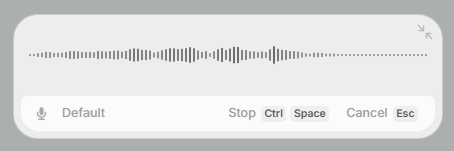
SuperWhisper is a voice-to-text tool that lives on my PC and my Samsung phone. On the computer, I press Ctrl+Spacebar to start, then begin talking, and press Ctrl+Spacebar again to stop. A moment later, the transcript lands directly in whatever text field I'm working in - email reply, blog draft, social caption, doesn't matter. If the text cursor is blinking, the words go there.
This is the voice bar that pops up on the PC while it's listening, waveform up top
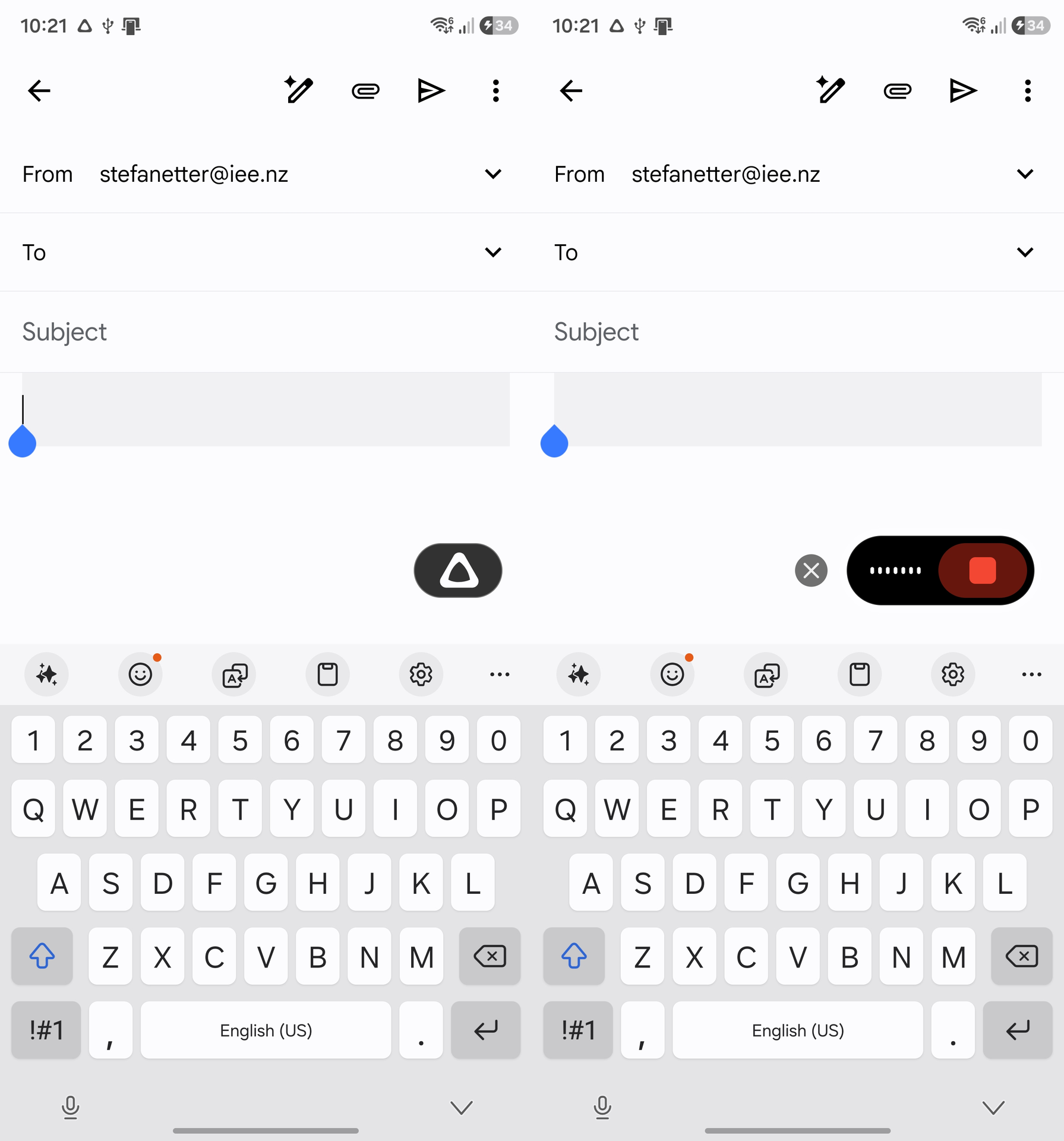
On the Samsung it's the same process through a different door: tap into any text field and a little hovering bubble icon appears shown on the left image. Tap that, it starts recording straight away shown on the right image, transcribes, and dumps the text.
The screenshots below show it in action - the bubble icon waiting in a text field on the phone, then the recording bar;
Why It Actually Saves Time
The team behind SuperWhisper gave me an official figures. The average person types about 40 words per minute. The average person speaks about 120 to 160 words per minute. Speaking is roughly 3 to 4 times faster than typing for most people.
That gap is the value of the tool. As a one-man band, reply speed matters - customers waiting on quotes, questions about parts, socials going quiet. A large share of my working day is written communication, and SuperWhisper roughly quarters the typing part of it. Over the past few months I've spoken somewhere around 300,000 words into it across my devices, and I'd say 99% of transcriptions come out flawless.
The Vocabulary Trick
Out of the box, transcription always stumbles on the same words - place names and technical terms. Whakatane for example, where we live, kept coming out wrong. The fix is simple: you add your own vocabulary in the app. Type in the words you use often, and SuperWhisper remembers them.
That compounds over time. The more local and technical words you feed it, the more polished the output gets - until you stop proofreading altogether. which i rarely do now, because that obviously chews up time too, i have alot of confidence in this tool and it genuinely epic.
The Part Takes Some Getting Use To
There's a interesting learning curve, and it's not technical. When you type, you think as you go - backspace, rephrase, restructure. When you speak, there is no backspace. You have to structure the entire response in your head from the first sentence, and train yourself to deliver it in one take.
I'm still working on that. But it's the same skill as anything else: it improves every week, and the payoff is a finished paragraph instead of a half-edited draft.
And it actually helps greatly as well in terms of normal communication day to day, where you're speaking directly to other people because you can deliver a message much more clearly because you've been training yourself every day to deliver a polished message on the first hit. By all means, I'm still not perfect at it, but I'm definitely impressed with my progress.
The Unexpected Side Benefit
Speaking clearly is a skill, and mine has never been the best. New Zealand English is rougher than, say, British English, and I slur words without noticing or just in general use the local lingo. Daily dictation has made me speak noticeably more clearly on calls and voice notes - an unplanned bonus from a typing tool.
Details Worth Knowing
- Works on macOS, Windows, iOS and Android - one licence covers all your devices.
- Works offline, with support for 100+ languages.
- Predefined and custom modes control tone and formatting - casual, formal, email, whatever the task needs.
- There's a free tier, there's a paid tier, and at the moment, there's still a lifetime subscription that you can purchase, which is what I got myself because I can see myself using this for as long as it exists. Always remember to invest in yourself and your business!
Official site: superwhisper.com ↗
Frequently asked questions
Common questions about SuperWhisper and voice dictation.
An AI voice-to-text app for macOS, Windows, iOS and Android. Press a hotkey, speak, and the polished transcript is pasted straight into the text field you're working in. More at superwhisper.com ↗
The average person types about 40 words per minute and speaks 120 to 160, so speaking is roughly 3 to 4 times faster. That's the official figure from the SuperWhisper team.
On the PC, Ctrl+Spacebar starts and stops recording. On Android, a hovering bubble icon appears in any text field - tap it to record. Both paste the transcript directly where the cursor is.
Yes. The transcription handles the accent well, and anything it mishears - like Whakatane - goes into your custom vocabulary once when you put it there and is remembered forever. Mine sits around 99 percent accuracy now.
Yes, offline transcription is supported, and it works in 100+ languages.
Free tier for everyday use obviously with some limitations, find that out for yourself, if you're going to use this every day, you will definitely benefit from going pro. (or a lifetime licence), with a 30-day refund if it's not for you.